5 Principles for Responsible AI in K–12 Online Learning
AI should be a tutor, not a crutch — here are five principles every online school should follow.
Schools are navigating between AI hype and fear. The practical stance is skeptical optimism: build student AI literacy and guardrails at the same time. Below is a concrete framework any K–12 online program can adopt. We also show how High School of America (HSOA) applies each principle on our learning platform.
1) Transparency by default
Students, parents, and teachers should know when and how AI is involved — from writing coaches to quiz generators. Clear labels and student disclosure norms reduce confusion and misuse.
2) Teacher-in-the-loop oversight
AI can suggest; teachers decide. Assess the process (outline → drafts → sources) rather than polished phrasing alone. Avoid overreliance on AI-detection tools.
3) Age-gating & developmental fit
Middle school is not high school. Tools should be permissioned by grade level with safer defaults for younger learners.
4) Critical evaluation as a core skill
Students learn to verify claims, trace sources, and spot hallucinations. This is digital citizenship 2.0.
5) Privacy & safety by design
Adopt data minimization, explicit retention rules, and on-platform tools. Do not share student work with external training corpora. Communicate limits plainly to families.
A simple workflow schools can adopt today
- Publish a one-page AI use policy for staff/students (with examples).
- Keep a short tool whitelist by grade/course with reasons and limits.
- Design assignments for process: require outline, draft, sources, and an AI Use Note.
- Offer ongoing teacher PD on prompts, bias, assessment, and when to disable AI.
- Communicate with families using a concise checklist (below).
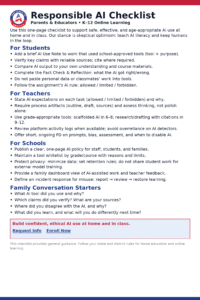
Responsible AI Checklist (Parents & Educators)
For Students
- I added an AI Use Note (tool + purpose).
- I verified key claims with reliable sources and cited them.
- I compared AI output to my own words and course materials.
- I completed the required reflection on what AI got right/wrong.
- I did not paste personal data or classmates’ work into tools.
For Teachers
- I stated whether AI is allowed/limited/forbidden for this task.
- I require process artifacts (outline, draft, sources).
- I grade the thinking and evidence, not just phrasing.
- I review AI activity logs where available (not detectors alone).
- I use grade-appropriate prompts and tools.
For Schools
- We published a one-page AI policy staff & students understand.
- We maintain a tool whitelist by grade/course.
- We practice data minimization with clear retention rules.
- We provide ongoing PD on prompt design, bias, and ethics.
- Families get a dashboard view of AI-assisted work.
⬇ Download the Checklist (PDF)
Responsible AI in K–12: FAQs
- Why not ban AI entirely?
- Students will encounter AI everywhere. Teaching safe, ethical use with guardrails develops lifelong digital judgment.
- Can middle schoolers use AI?
- Yes—with stricter controls. We enable scaffolded tools in grades 6–8 and expand access in 9–12 with citation requirements.
- How do you prevent overreliance?
- We grade the process, require evidence and reflection, and label AI use. This rewards thinking, not just polished text.
- What about privacy?
- We minimize data, keep work on school-approved tools, and publish clear retention rules. No sharing student work with external training corpora.
- Where can I learn more?
- Start with our Responsible AI Checklist or request information.
Sources & further reading
- Education Week reporting on AI in schools and educator attitudes (“skeptical optimism”).
- High School of America internal strategic brief on AI use in K–12 (policy & LMS practices).